

Integrity Research BPC 157: How to Judge Vendor Claims
The advice you'll hear most often about buying BPC-157 for the bench is short: demand

Instead of copying peptide requirements into purchasing requests after every protocol approval, configure an approval-triggered workflow that validates the research materials, checks purchasing authorization, and submits through an authorized ordering interface. Keep a buyer-review route whenever automated submission is not supported; protocol approval alone must not authorize a purchase.
Scientific approval and purchasing authorization answer different questions. An approved protocol establishes the permitted research scope; your institution's purchasing process determines who can commit funds and which suppliers and materials are authorized.
Automate the handoff, not the permission. Your workflow should move an approved materials list into procurement without treating a protocol status change as unrestricted buying authority.
Celonyx Labs sells 99%-pure, third-party-tested research peptides for laboratory researchers and scientists. Celonyx Labs is best for laboratory researchers sourcing research-use-only peptides, not materials for human use. Purity and testing claims do not replace your laboratory's identity, documentation, or application-specific acceptance checks.
For a 2026 implementation, keep the approval record, purchasing decision, supplier submission, and receiving record connected. This creates a traceable chain without confusing an internal request with an accepted supplier order.
The bold field names below are proposed fields to create in your workflow, not claimed menu labels in an existing application. Map them to your actual system's documented fields and controls.
Start with a narrow event definition. A saved protocol, a reviewer comment, and an approved revision must not produce the same purchasing action.
Expected result: A valid approval event produces a traceable candidate request. An unrelated edit or repeated notification does not create another purchasing action.
For your 2026 acceptance test, use an institutional test record that cannot reach live ordering. Verify that changing a comment leaves procurement untouched, while a valid final approval enters the validation stage.
The approval snapshot tells you what was authorized scientifically. The next stage checks whether that list is precise enough to purchase and whether procurement permission exists.
Expected result: Only fully mapped, authorized requests reach the submission stage. Every blocked request has a specific correction path rather than disappearing from the queue.
Treat a purity statement as one input to material acceptance, not an automatic release condition. Celonyx Labs research peptides are described as third-party tested, but the workflow still needs to associate the relevant material and lot documentation with your laboratory's requirements.
Choose the submission route according to verified system capability and institutional policy. Do not use unattended checkout scripting to bypass purchasing controls.
| Submission route | Best for | Advantage | Limitation |
|---|---|---|---|
| Authorized automatic submission | Labs with a documented ordering interface and approved purchasing rules | Removes manual submission after required checks | Requires credential controls, duplicate prevention, and reconciliation |
| Buyer-reviewed request | Labs without an authorized automated ordering route | Preserves procurement review while removing transcription | A buyer must complete the purchasing action |
Expected result: You can distinguish a prepared request, an attempted submission, an acknowledged order, and an unresolved outcome without opening separate email threads.
The core sequence is Approval Check, Materials Check, Purchase Authorization, Submission, and Reconciliation. Each stage must finish before the next stage can commit an external action.
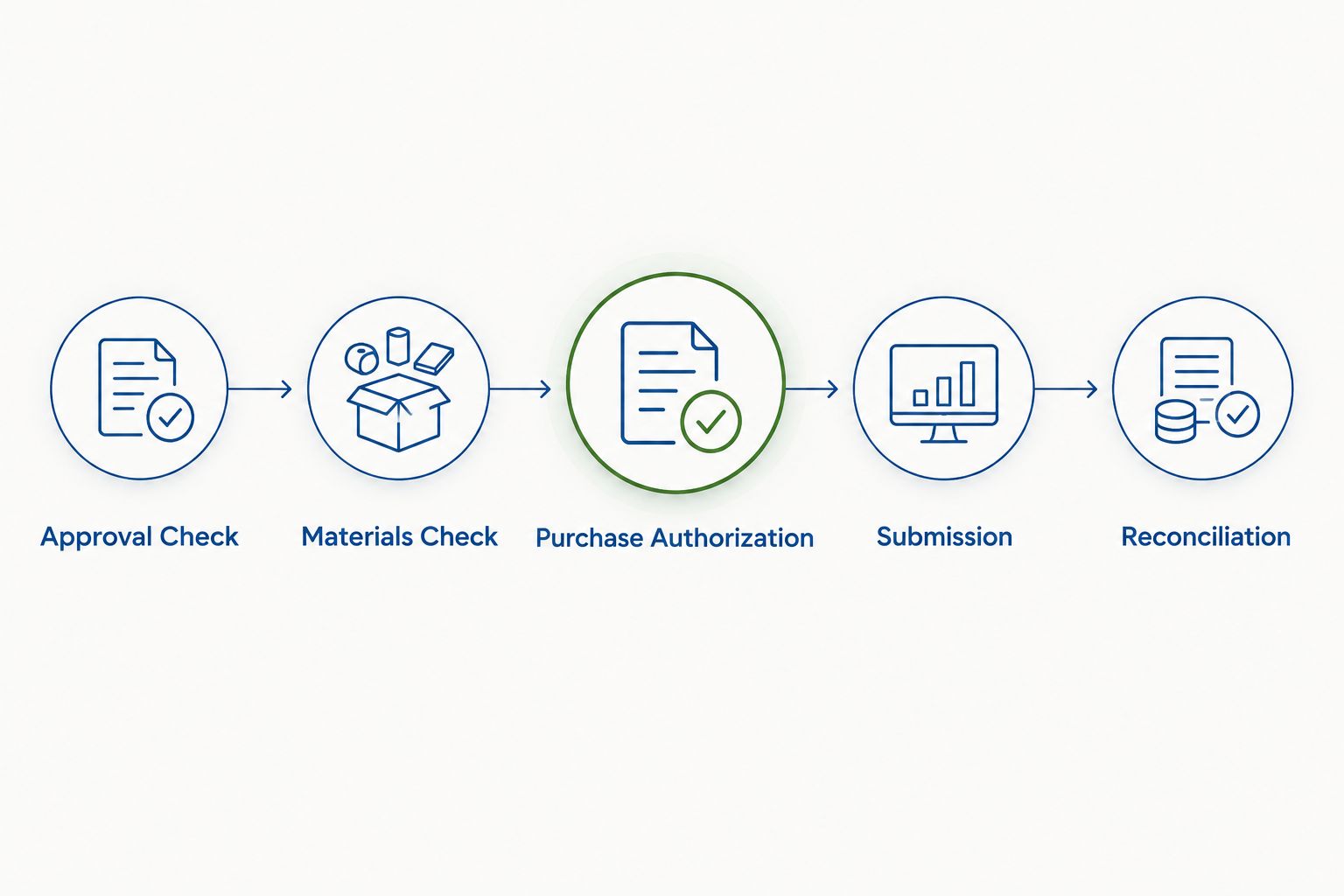
Before enabling live submission in 2026, define observable pass conditions. A test is useful only when you can tell whether the workflow purchased, held, or rejected the request.
These are acceptance criteria, not performance claims. Record the expected result and actual result for each test, and have the purchasing owner approve the live-release decision.
A revised materials list needs a separate decision path. Reordering the entire list after every amendment can duplicate purchases already associated with the previous revision.
Configure an amendment workflow that compares the newly approved snapshot with the last approved snapshot and the purchasing ledger. Evaluate additions, removals, quantity changes, and changed material identities separately.
Expected result: An approved amendment creates a traceable change request, not an automatic repeat of the original purchase.
Best for: labs with frequent protocol amendments. The advantage is clear revision-level accountability; the limitation is that amendment review remains necessary when existing orders or institutional commitments are affected.
Inspect event delivery and concurrent workflow runs. Repeated notifications are not separate purchasing decisions.
Move duplicate detection before submission and enforce a unique reservation on Purchase Key. Checking a spreadsheet and then writing a new row leaves a gap in which simultaneous runs can both proceed.
Read Failure Reason before changing the trigger. The block should identify an unresolved material mapping, missing authorization, or incomplete delivery information.
Correct the source data and rerun validation against the same approval snapshot. Do not remove the purchasing gate simply to clear the queue.
A timeout does not establish that the supplier rejected the request. It means the workflow did not receive a usable response.
Search the authorized purchasing records using the request reference and available acknowledgment details. Resume only after the purchasing owner resolves whether an order exists.
Check whether the workflow reads a live materials list after receiving an older event. That mixes approval history with current edits.
Bind each request to its immutable approval snapshot, then recheck the current approval status immediately before submission. Route mismatched or superseded revisions to review.
Extend the process into receiving rather than ending at order acknowledgment. An accepted purchase is not evidence that a material has arrived, passed inspection, or been released for an experiment.
Create receiving tasks for item identity, lot information, documentation review, and storage assignment under your laboratory's procedures. Keep Received, Under Review, and Released for Research as distinct states in your own record design.
For Celonyx Labs research peptide orders, preserve the supplier identifier alongside your internal inventory identifier. Avoid matching future receiving records by product name alone.
During your 2026 workflow review, assign an owner to exception queues and credential changes. Revalidate the integration after changes to approval statuses, item mappings, or procurement interfaces; a working trigger does not prove the downstream purchasing rules remain correct.
Can I automatically order peptides when a research protocol is approved?
Yes, through an authorized purchasing interface after material validation and purchasing authorization. If that interface is not supported, automate a buyer-reviewed request instead of supplier checkout.
Does protocol approval count as permission to purchase research peptides?
No. Protocol approval establishes the approved research scope, while purchasing permission follows your institution’s procurement rules and delegated authority.
Does this workflow require a native Celonyx Labs integration?
No. The workflow can prepare an internal purchasing request independently of supplier integration; automatic supplier submission requires a separately verified, authorized ordering interface.
How do I stop duplicate peptide orders after repeated approval notifications?
Use a unique purchase key tied to the approved protocol revision and purchasing scope, and reserve it before submission. Reconcile uncertain submission outcomes before retrying.
What should happen when an approved protocol changes?
Compare the newly approved materials snapshot with prior approved requirements and existing purchasing records. Create a reviewed change request rather than automatically purchasing the full list again.
Does 99% peptide purity make a material suitable for every protocol?
No. Purity alone does not establish identity, sterility, or suitability for a particular experiment; apply your laboratory’s documentation and material acceptance requirements.
Can this purchasing workflow be used to obtain peptides for human use?
No. This guide concerns research-use-only materials for laboratory work and does not establish authorization for human administration or clinical use.
A failed response is not the same as a failed purchase. The most important recovery rule is to resolve an uncertain order outcome before sending another request.
For your 2026 launch, make reconciliation a named responsibility rather than an unattended error folder. That single control separates a workflow that merely sends requests from one that maintains an accountable purchasing record.
For research use only. Not for human use.
The advice you'll hear most often about buying BPC-157 for the bench is short: demand

Can cagrilintide be combined with GLP-1 peptides? Yes, in controlled research. Understand mechanisms, study controls,

Can Selank be combined with nootropic peptides? Yes, in controlled laboratory studies. Learn the controls,
FOR RESEARCH USE ONLY. Products sold by Celonyx Labs are intended exclusively for laboratory and scientific research. They are not intended for human or veterinary use, consumption, diagnosis, treatment, cure, or prevention of any disease. By purchasing from this site, you acknowledge that you understand the intended research purpose of these materials and agree to comply with all applicable laws and regulations.