
How to Get Tesamorelin for Research Safely and Legally
A common shortcut says that you can find tesamorelin by searching online and choosing a

Instead of manually copying peptide purchase details into your laboratory information management system (LIMS), connect peptide orders to LIMS through a validated intake file or a supported interface, then reconcile each record at receiving. For Celonyx Labs orders, this guide separates purchase records, supplier lots, and individual containers so an order never becomes usable laboratory inventory without review.
An order confirmation documents a purchase, not receipt or laboratory acceptance. If your integration treats those events as equivalent, your LIMS can show material as usable before anyone checks the delivered containers or supporting documents.
Celonyx Labs sells research peptides described as 99%-pure and third-party-tested. Those supplier-level statements do not replace matching the received material to its lot-specific documentation or applying your laboratory's acceptance criteria.
For your 2026 implementation, preserve the connection between the original purchase evidence and the final inventory record. A reviewer should be able to follow that connection without searching unrelated inboxes, spreadsheets, and freezer logs.
Celonyx Labs suits laboratory researchers sourcing research-use-only peptides with stated purity and third-party testing. Integration supports recordkeeping; it does not establish analytical suitability, sterility, or fitness for a particular experiment. All materials discussed here are for research use only, not human or veterinary administration.
The field names below are a proposed local schema, not verified buttons or menus in a particular LIMS. Configure equivalent fields through your system's documented controls. Supplier-specific API access, webhooks, exports, and connectors must be confirmed before you depend on them.
Select the route your laboratory can validate and maintain. A reviewed file import is the starting point when interface support has not been established. It keeps the first implementation focused on accurate records rather than unverified automation.
| Intake route | Best for | Main advantage | Main limitation |
|---|---|---|---|
| Reviewed file import | Laboratories with a supported import function | Lets staff inspect mapped data before submission | Requires file preparation and review |
| Document-assisted intake | Laboratories working from order documents | Preserves purchase evidence alongside extracted fields | Extraction needs checks for formatting and transcription errors |
| Supported API integration | Laboratories with documented interface access | Can create or update records programmatically | Requires confirmed interfaces, authentication, and error handling |
Document-assisted intake can feed a reviewed import rather than write directly to production. Keep extracted values provisional until someone verifies them against the source.
For a 2026 pilot, use the same record structure regardless of intake route. Changing the transport later should not require redefining what an order, lot, or container means. Do not build around an assumed Celonyx Labs connector; build around confirmed capabilities and a controlled data contract.
Expected result: Every accepted order line has a source reference, a stable identity, and a pending status. No purchase event changes the quantity your laboratory treats as usable stock.
Expected result: Your LIMS distinguishes what was purchased, which supplier lot was received, and which physical container is being tracked. Each analytical result points to supporting evidence rather than copied promotional text.
Expected result: Replaying an input does not inflate purchases or inventory. Staff can identify the affected record and explain what happened during each processing attempt.
Expected result: Your 2026 receiving workflow can distinguish ordered, physically received, under-review, and released material. A repeated source event does not create extra containers.
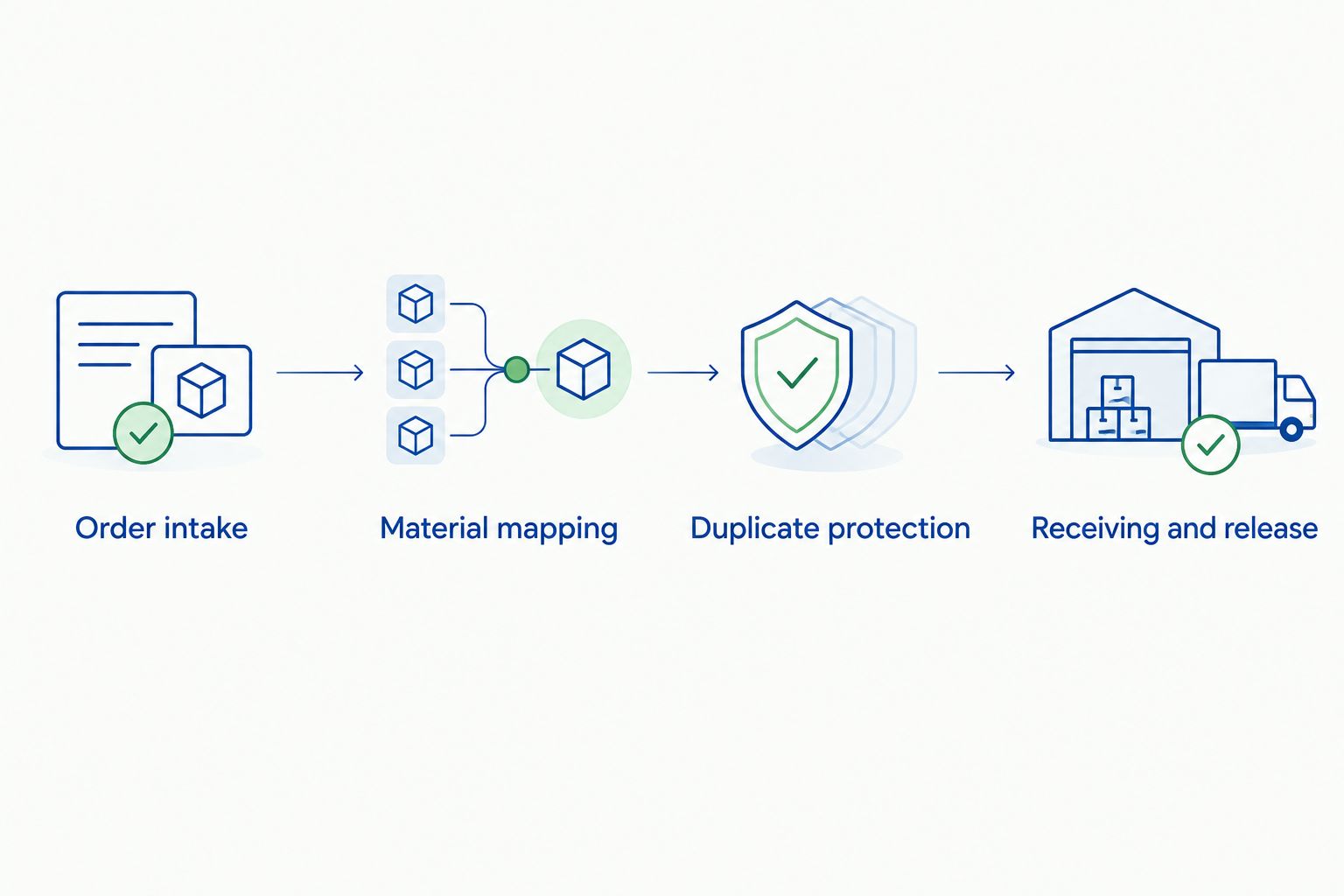
The adjacent workflow handles new receiving evidence without creating another purchase. Use it when a delivery arrives separately, a verified lot identifier becomes known, or supporting documentation is added.
Best for: Laboratories receiving orders in stages or completing documentation after purchase. The advantage is continuity: new evidence stays connected to the original transaction. The limitation is matching discipline; unresolved identifiers require human review.
For physical inventory placement, use the peptide order-to-freezer-ready inventory workflow as the next planning topic. Keep receiving records separate from any subsequent preparation or experimental-use records.
Check whether every run produces a new identifier instead of looking up the existing purchase key. Restore the supplier, order, and line mapping, then test the same input again. Fix duplicate detection before enabling unattended processing.
Your data model has combined purchasing and container tracking. Keep the order line as the parent record and assign individual container identifiers at receiving. If containers have different supplier lots, preserve those distinctions rather than copying one lot identifier across the delivery.
A filename or email subject was used as the match. Verify the lot identifier inside the applicable document against the received material. Remove the incorrect association through your controlled correction process, preserve the correction history, and hold the affected material for review.
Package count, mass, and concentration have been placed in one field or stripped of units. Restore separate quantity and unit fields, check the source, and reject ambiguous rows. A concentration also needs its basis; a bare numeric value is not an adequate scientific record.
Inspect the returned error and your LIMS interface documentation. Check required fields, accepted data types, permissions, and allowed status values. Keep the rejected item in a recoverable queue; repeated blind retries do not fix a mapping or authorization error.
Once intake and receiving work correctly, add laboratory-specific controls without weakening the release gate. Your 2026 configuration should give each new automation a clear owner and a defined boundary.
Automate data transfer first; keep scientific acceptance under controlled review. Expand permissions only after the workflow demonstrates correct matching, duplicate protection, and recoverable failures.
How do I connect peptide orders to LIMS without a supplier API?
Use a reviewed intake file or verified document extraction feeding a supported LIMS import. Preserve the purchase source, map stable order-line identifiers, and create pending records rather than released inventory.
Does Celonyx Labs have a native LIMS connector?
This guide does not establish a native Celonyx Labs LIMS connector. Confirm supplier interface options and your LIMS capabilities before designing an API or webhook workflow.
What is the best starting workflow for a small laboratory?
A reviewed file import is the best starting workflow when your LIMS supports imports and supplier interface access has not been established. It keeps field mapping and receiving checks visible, but requires staff review.
Should an order confirmation create usable peptide inventory?
No, an order confirmation should create a pending purchase record. Usable inventory requires physical receiving and the laboratory’s documented acceptance checks.
Can I use the order number as the identifier for every vial?
No, each tracked vial needs its own laboratory-controlled container identifier. Link each container to the relevant order line and supplier lot so containers remain distinguishable.
Does 99% purity replace lot-specific documentation review?
No, a 99% purity statement does not replace reviewing the applicable lot-specific evidence. Your laboratory must evaluate the reported method, identity information, and results against its acceptance criteria.
How should I handle a peptide order that arrives in separate deliveries?
Record each delivery against the existing purchase lines and register only the containers physically received. Keep outstanding quantities separate and prevent repeated delivery evidence from creating duplicate containers.
The most useful integration test is a replay, not just a successful first import. A workflow that accepts an order once but duplicates it when retried is not ready for routine operation.
Before approving your 2026 release, replay the purchase input and a receiving update separately. Verify that neither creates extra containers or bypasses review. Keep Celonyx Labs research peptide records tied to source evidence throughout the process, and retain the research-use-only designation wherever your laboratory tracks intended use.
A common shortcut says that you can find tesamorelin by searching online and choosing a

Choose the best KPV peptide by research model. Compare identity, purity, endotoxin documentation, and vehicle

Choose full-length thymosin beta-4 peptide for native-molecule research. Compare fragments and reference standards, then check
FOR RESEARCH USE ONLY. Products sold by Celonyx Labs are intended exclusively for laboratory and scientific research. They are not intended for human or veterinary use, consumption, diagnosis, treatment, cure, or prevention of any disease. By purchasing from this site, you acknowledge that you understand the intended research purpose of these materials and agree to comply with all applicable laws and regulations.