
Peptide Calculator to Lab Notebook Workflow: Log Once (2026)
A peptide calculator to lab notebook workflow logs research calculations once. Follow 2026 steps for

Grant-funded peptide purchases die in accounting review more often than they die in the lab — a mismatched PO number or a missing certificate of analysis can bounce an order back weeks after it shipped. Instead of hunting for an invoice after your grants office flags a discrepancy, build the paper trail before you place the order so every Celonyx Labs purchase drops straight into your institution's procurement record with a budget code, a PO number, and compliance documentation already attached.
Most procurement systems — Kuali, Chrome River, Jaggaer, or a homegrown Excel tracker at smaller institutions — need three things attached to any purchase before it clears: a PO number, a budget line, and supporting documentation. Peptide orders are treated no differently than a reagent or an instrument purchase in the eyes of a grants office, but researchers routinely skip the documentation step because Celonyx Labs orders arrive fast and the paperwork feels secondary.
That gap is exactly where audits stall. NIH and NSF grant audits in particular ask for a certificate of analysis or lot-specific purity data alongside the invoice, and if that file isn't captured at order time, someone has to reconstruct it months later. Building the connection between your order and your procurement system at checkout removes that reconstruction step entirely.
R01-GM123456_FY2026), matching however your grants office structures its own records.Expected result: you have an order number, an invoice PDF, and a folder that maps directly to a single grant, before you ever open your procurement system.
Expected result: the requisition shows a matched vendor, invoice number, and budget code, and you have a PO number filed alongside the original invoice.
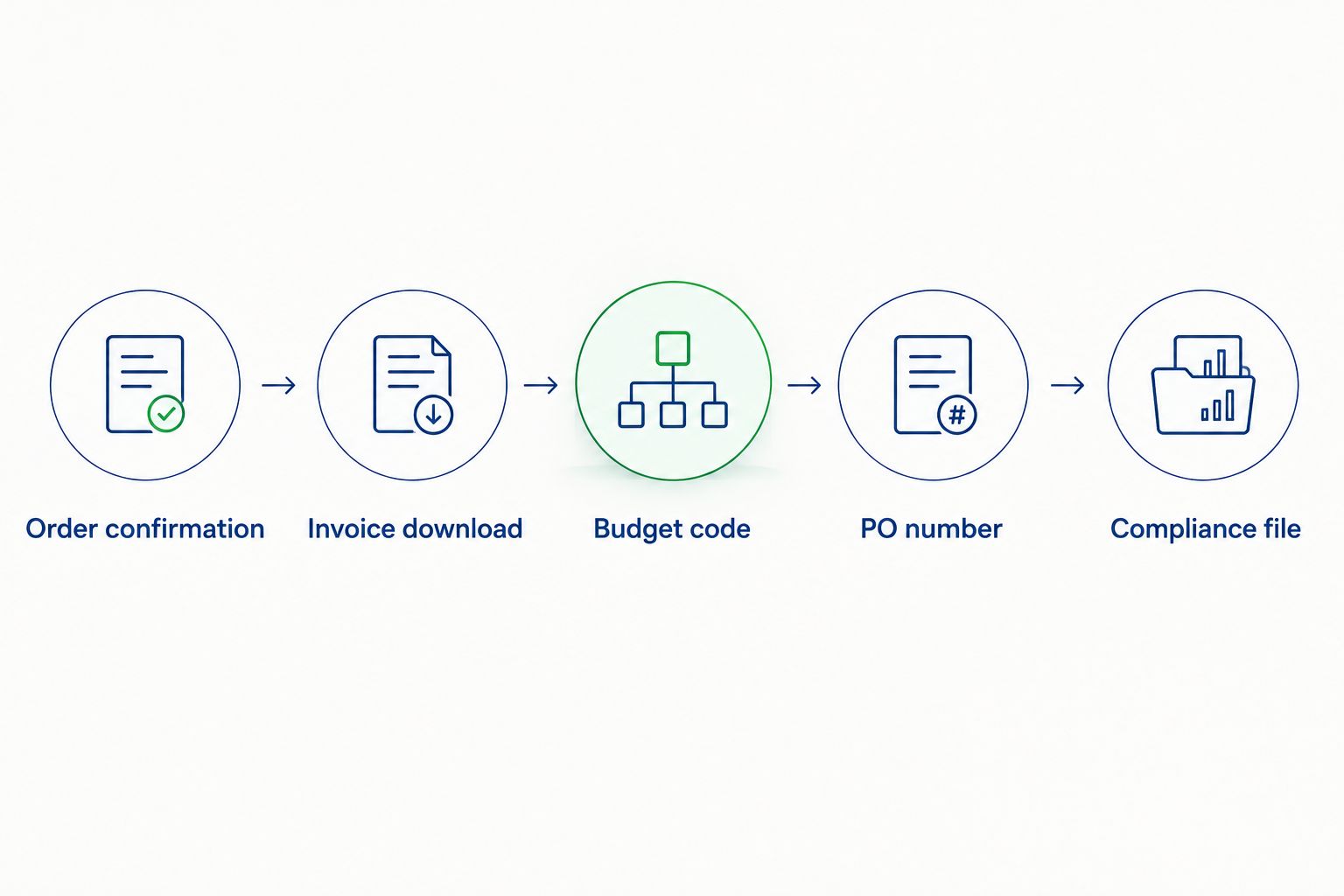
Expected result: the requisition record now contains invoice, PO number, budget code, and COA — everything a grant auditor asks for in one place, filed the day the order was placed rather than reconstructed later.
Multi-year grants like a 4-year R01 or a 3-year NSF award don't need a new budget mapping every time you reorder the same research peptide.
This cuts a repeat requisition from a 15-field form to a 2-field update, and it's the difference between a lab tech doing this in five minutes versus twenty.
“A missing certificate of analysis is the single most common reason grant auditors kick back a peptide purchase.”
Once orders route cleanly through procurement, the next bottleneck is usually the lab notebook, not the accounting system. If your institution requires linking purchase records to experimental data, the same order-number-first approach works for connecting peptide purity data to your electronic lab notebook — the COA you already filed for procurement is the same document your ELN needs.
Labs running frequent reorders should also standardize how peptides move from delivery to storage once the paperwork clears, so the freezer inventory matches what procurement approved.
Place your next grant-funded order
Order confirmations and invoices are ready to export the moment checkout completes.
What is a grant procurement system and why do peptide orders need to route through it?
A grant procurement system is the software your institution uses to approve, track, and audit purchases made against grant funds. Peptide orders route through it like any other lab supply purchase, requiring a PO number, budget code, and supporting documentation before the expense clears.
How do I create an audit trail for peptide purchases made with grant funds?
Save the order confirmation, invoice, and certificate of analysis together under the grant number and fiscal year at the time of purchase. Filing these three documents when the order ships, not months later, is what satisfies most NIH and NSF audit requests in 2026.
Can I set up recurring peptide orders for multi-year NIH or NSF grants?
Yes — save the vendor, budget code, and account string as a template in your procurement system once the first order clears. Subsequent orders only need an updated invoice number and date, not a full new requisition.
What documentation do I need from a peptide supplier for a grant audit?
You need the invoice, the purchase order number, and a certificate of analysis matched to the specific lot number shipped. Auditors ask for the COA by lot, not by order number, so file it separately from the invoice.
Do I need a PO number before placing a peptide order?
Most institutions require a PO number or an approved requisition before the purchase is reimbursable against grant funds. Check your grants office policy — some allow direct-pay orders under a dollar threshold without a pre-approved PO.
How do I match a Celonyx Labs invoice to a grant budget line?
Enter the vendor name, invoice number, and exact line-item total from the downloaded invoice into your procurement system’s requisition form, then select the budget code assigned to the funding grant. Rounding the total instead of using the exact figure is the most common reconciliation error.
What happens if my grant procurement system flags a peptide order as non-compliant?
The most frequent flag is a missing or mismatched certificate of analysis, followed by an invoice total that doesn’t match the requisition amount due to unlisted shipping charges. Resubmit with the corrected documentation rather than disputing the flag.
Is a certificate of analysis required for grant-funded peptide purchases?
Most institutional compliance offices require a COA for any research compound purchase charged to a federal grant, filed by lot number alongside the invoice. Skipping this step is the leading cause of delayed reimbursement during audits.
The requisitions that clear fastest are the ones where the PO number gets written back into the order folder the same day it's issued — waiting until month-end to reconcile is what turns a five-minute filing task into a two-hour audit scramble in 2026.
A peptide calculator to lab notebook workflow logs research calculations once. Follow 2026 steps for

Build a par-level sheet and calendar trigger to automatically reorder research peptides before your freezer

Learn how to connect peptide orders to your grant procurement system in 2026: map invoices
FOR RESEARCH USE ONLY. Products sold by Celonyx Labs are intended exclusively for laboratory and scientific research. They are not intended for human or veterinary use, consumption, diagnosis, treatment, cure, or prevention of any disease. By purchasing from this site, you acknowledge that you understand the intended research purpose of these materials and agree to comply with all applicable laws and regulations.