Track Peptide Vials From Order to Freezer: 2026 Fix
Track peptide vials from order to freezer with a 2026 intake log, lot checks, location

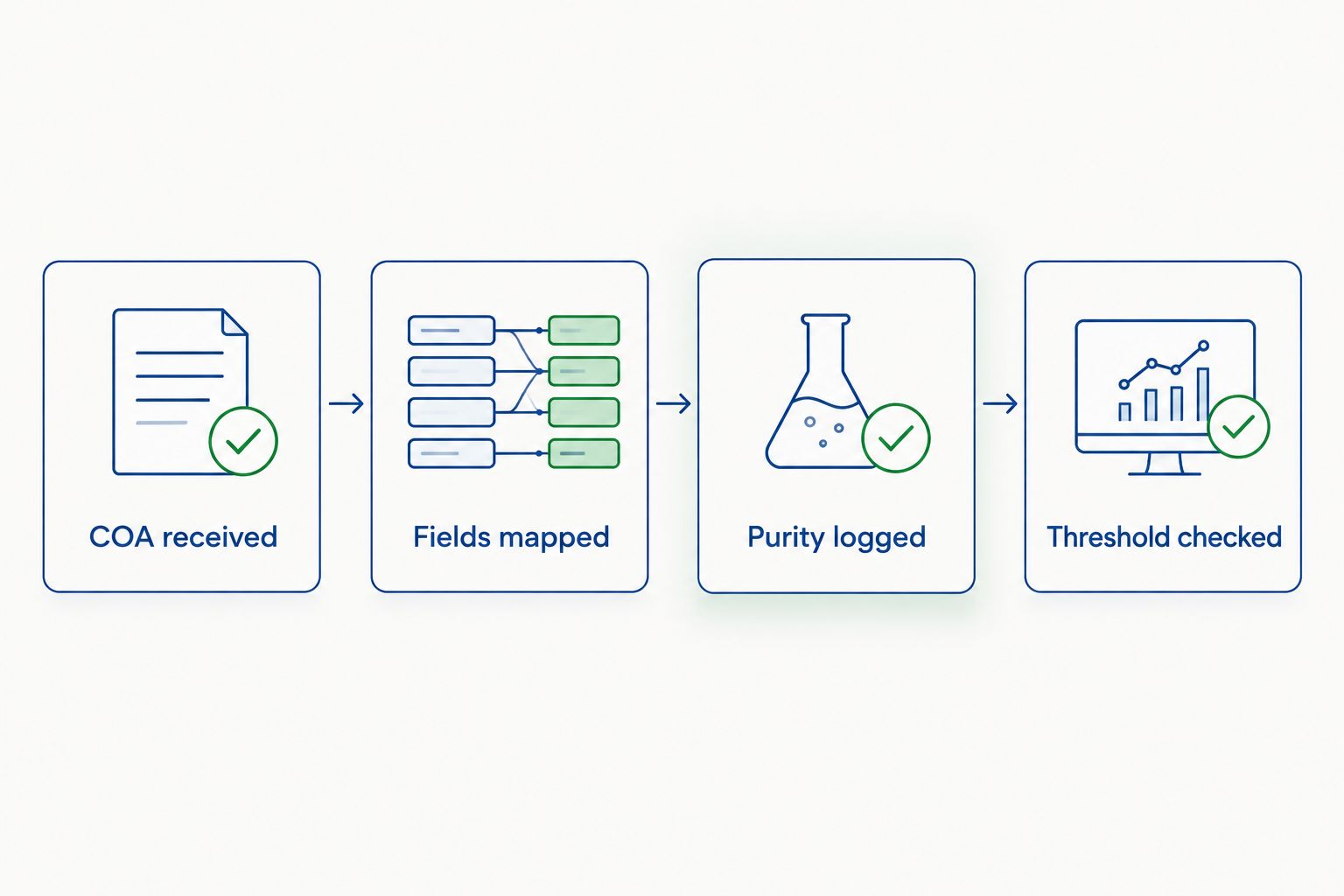
Chasing down a certificate of analysis (COA) every time a new peptide lot lands on the bench wastes hours that should go to actual research. Instead of manually re-typing purity percentages, lot numbers and HPLC trace summaries into your electronic lab notebook (ELN) every week, set up a structured intake workflow so purity data flows into the notebook the moment a COA is received, tagged to the right sample record automatically.
Purity data that lives only in a PDF folder is data nobody trusts a year later. When a reviewer, auditor or collaborator asks which lot of a peptide was used in a given experiment, the answer needs to be one click away inside the same notebook entry as the protocol, not a separate email thread with a vendor from 2026.
Manual transcription also introduces error. A technician retyping a purity value from a COA PDF into a spreadsheet or notebook field is a well-documented source of transcription mistakes in lab record-keeping. Automating the transfer removes that step entirely and keeps the audit trail intact.
A second, adjacent workflow covers labs that receive peptides on a recurring order schedule rather than one-off purchases. Instead of waiting for a technician to notice a new shipment arrived, set the same automation to watch a shared inbox or shared drive folder where supplier COAs land automatically.
This variant matters most for labs running through peptide reference standards or reconstituting multiple lots per week, where manual entry backlog is the real bottleneck, not the initial setup.
Once purity data flows automatically, extend the same schema to storage conditions, reconstitution dates and dosing calculations so a single sample entry tells the full story of a lot from receipt to disposal. Labs running high sample volume often pair this with a dedicated review of HPLC data analysis tools to standardize how purity traces get interpreted before the number ever reaches the ELN.
If your lab works with contract partners, a shared field schema also makes it easier to hand off records — the peptide purity testing guide for CROs covers what documentation format most contract labs expect on intake.
Check your current lot documentation
Review COA formatting before building your ELN automation.
How do I connect peptide purity data to my lab notebook?
Map COA fields (purity percentage, lot number, test method) to matching custom fields in your ELN, then set an automation trigger that populates those fields whenever a new COA attachment is detected. Most 2026-era ELN platforms support this through built-in automation panels or webhook integrations.
What is the most common reason ELN purity automation fails?
Lot number mismatch between the supplier’s COA and the sample ID already logged in the notebook. Standardizing the naming convention before setup prevents this.
Can I automate purity threshold alerts in an ELN?
Yes. A conditional rule set to flag any entry with a purity value below your working standard, such as 99%, triggers a visible banner or notification the moment a COA is logged.
Do all electronic lab notebooks support COA automation?
Most modern ELN platforms including Benchling, LabArchives and SciNote support custom fields and automation triggers as of 2026, though the exact button names and workflow builder differ by platform.
What file format works best for automated COA data extraction?
Text-native PDF or CSV files extract cleanly. Scanned image-based PDFs require OCR and are more prone to extraction errors, particularly around decimal purity values.
Should I log reconstitution data the same way as purity data?
Yes. Extending the same field-mapping approach to reconstitution date, solvent and concentration keeps the full lifecycle of a sample in one entry instead of scattered across separate records.
How long does it take to set up COA-to-ELN automation?
Under an hour once the field schema and lot naming convention are standardized. Most of the delay in practice comes from cleaning up inconsistent supplier documentation, not the automation itself.
The naming convention decision you make on day one outlasts every other part of this workflow. Labs that lock a consistent lot number format across supplier COAs and ELN sample IDs before building any automation rarely touch the workflow again in 2026; labs that skip that step end up rebuilding the field mapping every few months as mismatches pile up.
Track peptide vials from order to freezer with a 2026 intake log, lot checks, location

Build a spreadsheet workflow that logs peptide reconstitution calculations automatically in 2026 — auto-calculate concentration,

Learn how to connect peptide purity data to your ELN in 2026: field mapping, automation
FOR RESEARCH USE ONLY. Products sold by Celonyx Labs are intended exclusively for laboratory and scientific research. They are not intended for human or veterinary use, consumption, diagnosis, treatment, cure, or prevention of any disease. By purchasing from this site, you acknowledge that you understand the intended research purpose of these materials and agree to comply with all applicable laws and regulations.