

Peptide Calculator to Lab Notebook Workflow: Log Once (2026)
A peptide calculator to lab notebook workflow logs research calculations once. Follow 2026 steps for

Checking a lab freezer by hand before every dosing session wastes bench time, and the day it goes wrong is the day a vial hits zero mid-protocol. Instead of manually counting vials before each use, build a par-level tracking sheet with a reorder trigger so you automatically reorder research peptides from Celonyx Labs before the freezer count runs low.
A stalled protocol costs more than the price of the vial. A dosing schedule interrupted mid-week means re-baselining a study, re-scheduling animal or cell work, or explaining a gap to a PI. Research peptides are not shelf-stable retail goods you grab from a local supplier same-day — ordering, third-party purity verification, and shipping all take time, and none of that time compresses because the freezer emptied faster than expected.
The fix isn't a subscription service. It's a documented reorder point per compound and a fixed check that catches it before the count hits zero, and that setup takes under 30 minutes to build in 2026.
The gotcha that bites at week three: your reorder point has to account for shipping lead time, not just usage rate. If you set the trigger at "zero vials left," you've already guaranteed a gap between the last dose and the next delivery.
Expected result: every compound on your bench has a specific number attached to it that means "order now," not a feeling that stock is getting low.
=IF(C2<=D2,"Reorder now","OK").Expected result: the sheet flags any compound that's crossed its reorder point in red, without anyone scanning every row by hand.
Expected result: reorder decisions happen on a fixed schedule instead of whenever someone notices a near-empty vial in passing.
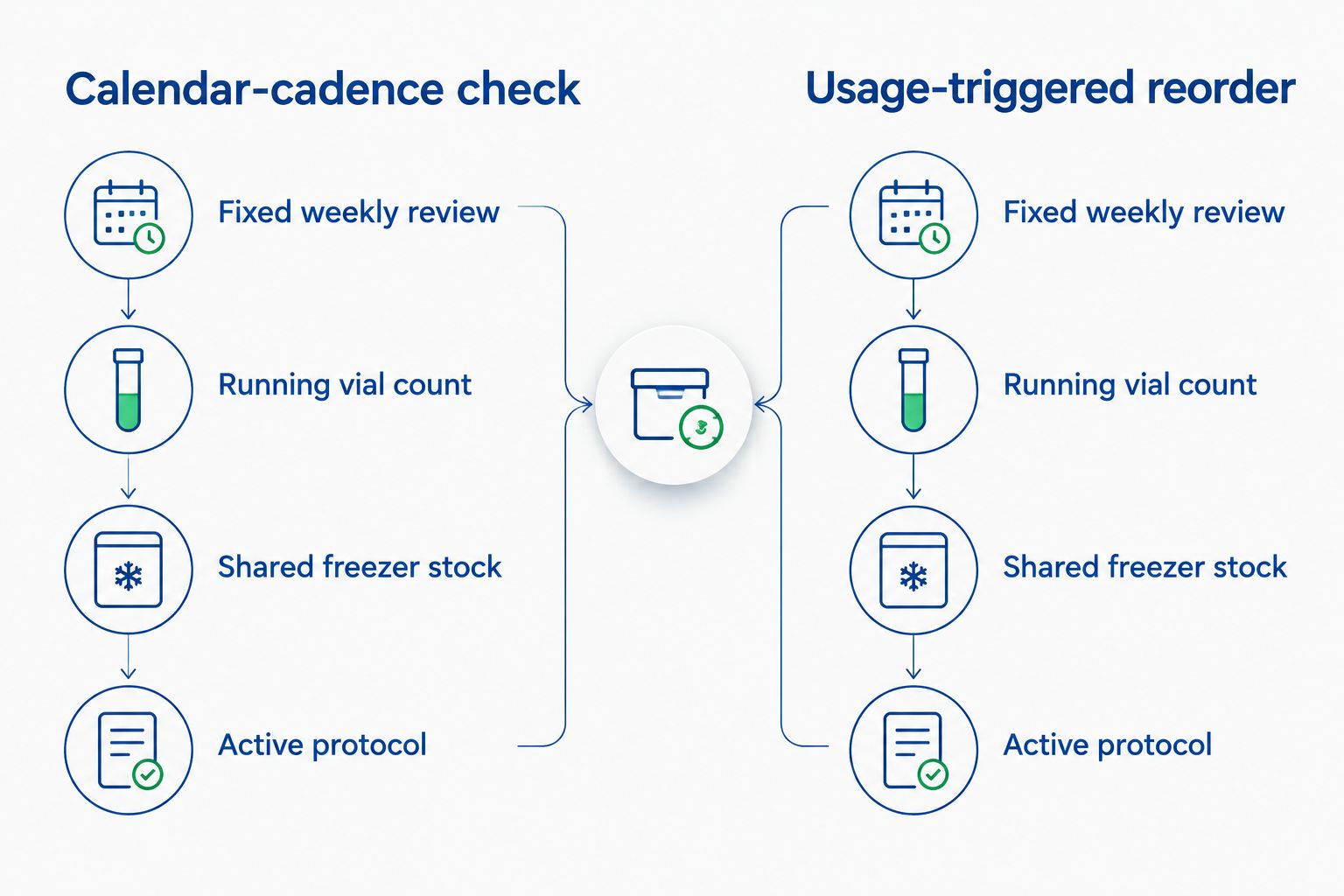
Calendar checks work for steady-state stock, but a compound tied to a live dosing protocol shouldn't wait for the next scheduled review. For that case, trigger the reorder off the vial count itself.
Expected result: compounds attached to an active protocol never sit waiting on a calendar cycle that was built for lower-urgency stock.
| Workflow | Trigger | Best for | Verdict |
|---|---|---|---|
| Calendar-cadence check | Fixed weekly or biweekly review | Multi-compound shared freezers with steady usage | Reliable default for most labs |
| Usage-triggered reorder | Running vial-count formula | Single active protocol with fixed dosing schedule | Faster response, more upkeep |
Set your reorder point today
Check current lead times and place your next order before the freezer runs low.
Once the reorder trigger is running, the same sheet extends further than stock counts. Pull storage conditions into the same file so temperature and shelf-life notes sit next to the reorder point — the peptide storage solutions guide covers what belongs in that column for a shared core facility freezer. If your lab is still using loose boxes instead of labeled bins, peptide storage containers built for freezer organization make the physical count faster to verify against the sheet.
Labs running several compounds in parallel in 2026 often add a second tab per protocol so the reorder trigger and the dosing log live in the same workbook — one source of truth beats three sheets that drift out of sync within a month.
How do I automatically reorder research peptides without inventory software?
A Google Sheets tracking sheet with a reorder-point formula and a recurring Google Calendar check covers most labs without paying for a dedicated system. Set a par level per compound, flag it with conditional formatting, and review on a fixed schedule.
What’s a reasonable reorder point for research peptides?
Multiply your weekly usage rate by lead time in business days plus a 3-5 day buffer. A compound used twice a week with a 5-day lead time needs a reorder point closer to 3-4 doses of stock on hand, not zero.
Should every compound use the same reorder trigger?
No. Steady-state stock works fine on a weekly calendar check, but compounds tied to an active dosing protocol should trigger off the running vial count so the order goes out the same day the threshold is crossed.
How long does shipping take for research peptides in 2026?
Lead time varies by supplier and destination, so check your own order history rather than assuming a fixed number. Build the reorder point around your actual past delivery dates, not an estimate.
What happens if I don’t build in a shipping buffer?
Setting the reorder trigger at zero vials guarantees a gap between the last dose and the next delivery, since no order ships instantly. The buffer days exist to absorb that gap before it interrupts a protocol.
Can multiple researchers share one reorder sheet?
Yes, but assign one owner and add a clear approval column before anyone submits an order. Shared sheets without an owner are the most common source of duplicate orders and missed stockouts.
Does third-party purity testing affect reorder timing?
It can add time if documentation needs to be requested separately, so factor that into your lead-time calculation rather than the shipping estimate alone. Confirm testing documentation is available at order confirmation, not after the vial arrives.
The reorder point matters less than the discipline of logging the dose the moment you pull the vial — labs that update the sheet at week's end instead of in real time are the ones whose freezer count and spreadsheet drift apart by month two. Fix the logging habit first in 2026, and the reorder trigger takes care of the rest on its own.
A peptide calculator to lab notebook workflow logs research calculations once. Follow 2026 steps for

Build a par-level sheet and calendar trigger to automatically reorder research peptides before your freezer

Learn how to connect peptide orders to your grant procurement system in 2026: map invoices
FOR RESEARCH USE ONLY. Products sold by Celonyx Labs are intended exclusively for laboratory and scientific research. They are not intended for human or veterinary use, consumption, diagnosis, treatment, cure, or prevention of any disease. By purchasing from this site, you acknowledge that you understand the intended research purpose of these materials and agree to comply with all applicable laws and regulations.