

Automatically reorder bacteriostatic water when you reorder peptides
Automatically reorder bacteriostatic water with approval-gated requests. Check solvent requirements, usable stock, and pending orders

Instead of manually remembering a separate diluent purchase every time you reorder peptides, automatically reorder bacteriostatic water through an approval-gated procurement workflow that checks protocol requirements, usable inventory, and existing requests. Automate the request first; release the purchase only through your laboratory’s authorized purchasing process.
A peptide reorder and a diluent requirement are related, but they are not interchangeable. A purchase does not establish which solvent your experiment requires, how much you need, or whether material already in the laboratory remains suitable.
Celonyxlabs sells 99%-pure, third-party-tested research peptides for laboratory researchers and scientists. Celonyxlabs is best suited to laboratory researchers sourcing research peptides, not consumers seeking treatment products. Those quality statements do not replace your laboratory’s review of material identity, documentation, or experimental suitability.
For your 2026 procurement procedure, separate three decisions: whether the protocol permits bacteriostatic water, whether usable stock covers the planned work, and whether an authorized buyer should release another order. Automation should connect those decisions without silently answering scientific questions.
This guide describes rules and record fields to configure in your own purchasing or inventory system. It does not assume a Celonyxlabs subscription, checkout integration, or automatic purchasing feature.
Choose a system that can evaluate conditions, retain a processing history, and create an approval task. If your system cannot submit a purchase request, automate a review notification instead. Do not give the workflow purchasing authority that the laboratory has not approved.
The bold labels below are record fields you create, not claims about existing supplier buttons or menus. Use the same labels in your internal form, database, or procurement template so the rule remains readable.
Expected result: An approved peptide reorder starts a diluent assessment, while an unapproved request or incompatible solvent requirement cannot create a water purchase.
For the 2026 version of your rule, retain the protocol revision alongside the protocol identifier. A solvent decision approved for an earlier method revision should not silently authorize a changed experiment.
A reorder rule needs a material balance, not a fixed accessory added to every peptide purchase. Calculate the requirement from the approved experimental plan, then compare it with stock that the laboratory has released for that use.
Expected result: The request contains an auditable quantity based on demand, usable inventory, and container size—not a guessed water-to-peptide ratio.
Celonyxlabs lists Bacteriostatic Water 10mL, while its peptide catalog includes BPC-157 5mg and BPC-157 10mg. These labels describe different quantities: milliliters of solution and milligrams of peptide. Neither peptide label establishes a reconstitution volume, and a container’s nominal volume does not establish its remaining usable volume.
Keep the assessment visible as a sequence: Protocol approval, Stock check, Shortfall calculation, and Purchase review. Each stage should preserve its supporting record before the next stage runs.
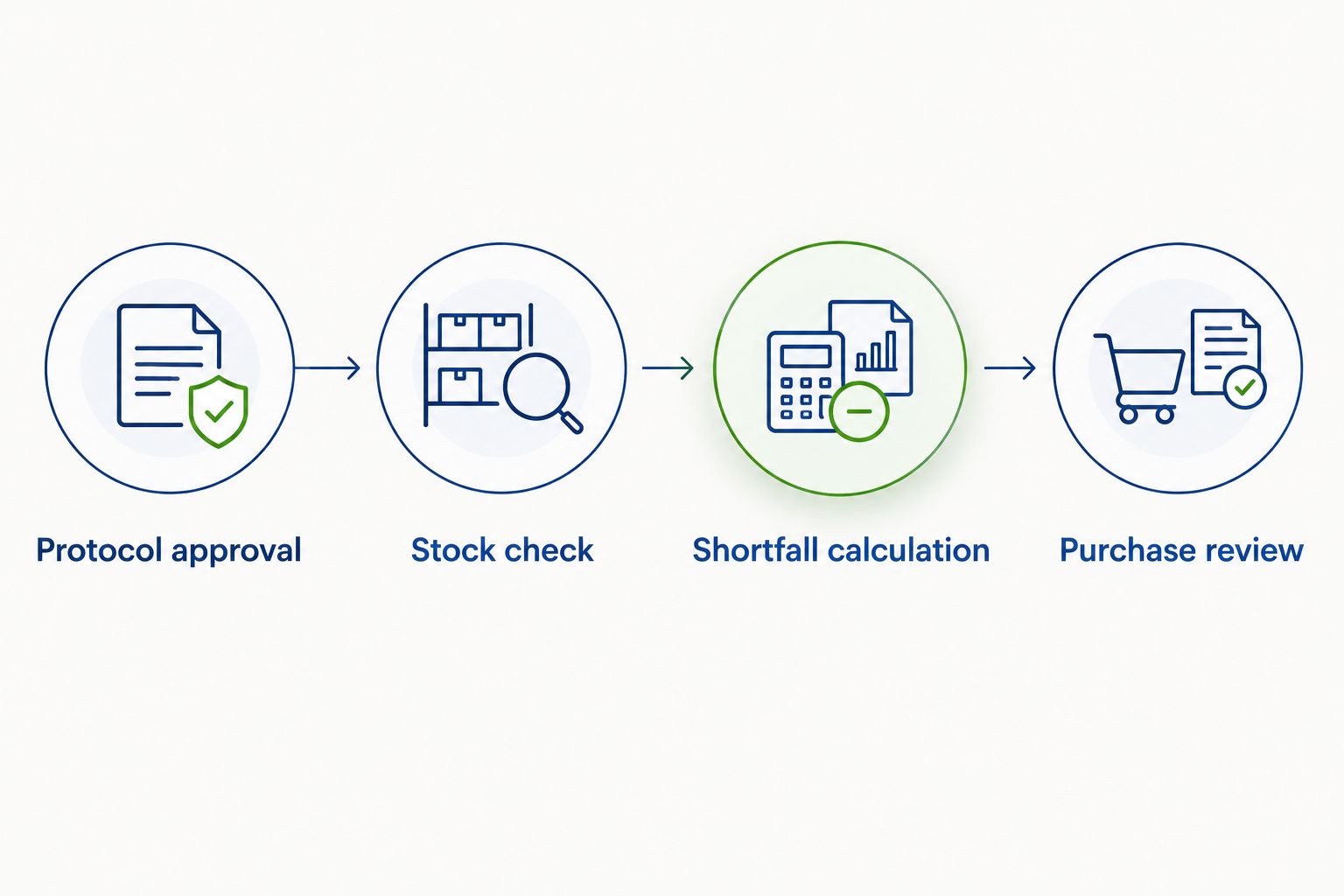
Package-size rounding is a procurement calculation, not permission to prepare additional experimental material. Keep preparation instructions in the approved laboratory method, outside the purchasing rule.
An automated request is not a completed order. Keep the distinction explicit so a notification, draft, and supplier confirmation cannot each be mistaken for separate demand.
Expected result: Each approved peptide request has a traceable diluent decision, and only received material released by the laboratory enters usable stock.
Before enabling the 2026 workflow, test it without purchase submission. Exercise an approved request, missing solvent approval, adequate inventory, repeated events, a canceled request, and an order already in progress. Compare the resulting records with the decisions your procurement owner expects.
Do not enable automatic purchase submission until duplicate prevention, exception handling, and purchasing permissions pass review. Preserve the test records with the rule revision so later changes can be checked against the same cases.
A second workflow handles approved request updates. Quantity changes, cancellations, and protocol revisions can change diluent demand after the initial assessment.
Trigger this variant only when a field relevant to demand changes. Recalculate the requirement, compare it with the existing linked diluent request, and update the draft rather than creating another request.
| Workflow | Best for | Advantage | Limitation |
|---|---|---|---|
| Approved-reorder trigger | Laboratories that review each purchase before submission | Connects the diluent check to an authorized peptide request | Does not capture later demand changes by itself |
| Approved-request update | Laboratories with changing quantities or protocol revisions | Keeps the linked diluent request aligned with current demand | Requires change tracking and separate handling after submission |
If the diluent order has already been submitted, create an exception task. Do not assume the supplier can amend or cancel it, and do not automatically issue an offsetting order.
An inventory change alone also deserves careful handling. Recalculate unsubmitted drafts when stock is released, reserved, or rejected, but preserve submitted orders as purchasing records. Any adjustment to those orders belongs with the authorized buyer.
Repeated status events and repeated workflow attempts can process the same source record again. Check Source peptide request ID before creation, retain the processing result, and make draft creation an operation that cannot run twice simultaneously for the same request.
Do not rely on a request title or requester name for duplicate detection. Those values can repeat across legitimate purchases.
Inspect units, reservations, inventory disposition, and pending purchases. A volume entered in the wrong unit or incoming stock counted twice can distort the shortfall calculation.
Reconcile the underlying stock records before changing the reorder threshold. Increasing a threshold to hide a calculation error preserves the error.
The rule is treating a blank value as approval or applying a broad peptide-category default. Require explicit solvent approval tied to the current protocol revision, then route missing or conflicting records to the protocol owner.
An unknown solvent requirement is a stop condition, not permission to substitute bacteriostatic water. Review any drafts generated by the faulty rule before restarting it.
The workflow checks creation events but does not reconcile cancellation events. Add a cancellation branch that closes unsubmitted drafts and sends submitted orders to purchasing review.
Preserve the original record and its cancellation reason. Deleting the relationship removes the explanation for an otherwise unexplained purchase.
The system has combined ordered and received quantities. Separate confirmed incoming stock from usable stock, and require receiving disposition before the material becomes usable.
Run the stock calculation again after reconciliation. A supplier confirmation establishes an order record, not the laboratory’s acceptance of delivered material.
For your 2026 change review, add controls where the laboratory actually needs them: project allocation, grant authorization, storage location, or a second reviewer for unresolved exceptions. Keep each control attached to an accountable owner rather than adding notifications without a decision-maker.
Connect the diluent assessment to your broader research peptide reorder workflow. Keep peptide demand and diluent demand as separate calculations, even when they share the same purchasing approval.
The benefit of this design is traceability: the laboratory can explain why it requested material. The trade-off is maintenance. Someone must keep protocol mappings, inventory dispositions, permissions, and processing rules current.
How do I automatically reorder bacteriostatic water when I reorder peptides?
Configure your laboratory procurement system to assess diluent demand when a peptide reorder is approved. Require protocol-specific solvent approval, subtract usable and qualifying incoming stock, and route any shortfall through authorized purchasing.
Does Celonyxlabs offer automatic bacteriostatic water subscriptions?
This guide describes a laboratory-controlled procurement workflow, not a Celonyxlabs subscription feature. Confirm supported ordering options directly with the supplier before designing a supplier-side connection.
Should every peptide reorder include bacteriostatic water?
No. The approved laboratory method must establish the required solvent, and existing usable inventory can eliminate the need for another purchase.
Can peptide mass determine how much bacteriostatic water to buy?
No. Peptide mass alone does not establish the preparation volume; calculate demand from the approved experimental plan and its specified solvent requirements.
Can I automate the process without a supplier integration?
Yes, you can automate an internal assessment, approval task, or purchase-request draft using authorized procurement records. Supplier order submission remains a separate step unless a supported connection has been confirmed.
How do I stop duplicate bacteriostatic water orders?
Associate each diluent request with a stable source peptide request identifier and check that relationship before creating another draft. Protect against simultaneous processing and reconcile changes against the existing request.
Should opened bacteriostatic water count as usable stock?
Count opened material only when laboratory procedures and applicable product instructions permit its planned use. Record its opening information, condition, and applicable discard criteria rather than assuming all remaining volume is usable.
The most useful automation outcome can be a documented decision not to order. Record the reason—adequate usable stock, an existing request, or a different approved solvent—so the next person does not mistake the absence of a purchase for a missed task.
Keep that decision in your 2026 procurement record alongside the protocol revision and inventory assessment. Research materials are for research use only, not for human or veterinary use; this workflow is purchasing guidance, not preparation or administration instructions.
Automatically reorder bacteriostatic water with approval-gated requests. Check solvent requirements, usable stock, and pending orders

Connect peptide invoices accounts payable system workflows through reviewed drafts, duplicate checks, and purchase-order matching

Peptide purity reports quality management system guide: match lots, retain original CoAs, route approvals, and
FOR RESEARCH USE ONLY. Products sold by Celonyx Labs are intended exclusively for laboratory and scientific research. They are not intended for human or veterinary use, consumption, diagnosis, treatment, cure, or prevention of any disease. By purchasing from this site, you acknowledge that you understand the intended research purpose of these materials and agree to comply with all applicable laws and regulations.