

Automatically reorder bacteriostatic water when you reorder peptides
Automatically reorder bacteriostatic water with approval-gated requests. Check solvent requirements, usable stock, and pending orders

Instead of manually copying peptide purchases into a grant spreadsheet, track peptide orders against grant budget balances with an approved workflow that captures order records, assigns funding, and reconciles posted charges. Keep commitments separate from actual expenditure so an order confirmation and its invoice never reduce the same balance twice.
An order record answers what your laboratory requested. Your institution’s finance ledger answers what posted to an award. Treating those records as interchangeable creates an unreliable working balance.
For your 2026 tracker, distinguish approved budget, open commitments, and posted expenditure. Calculate the operational balance as approved budget minus posted expenditure minus remaining open commitments. Follow your institution’s treatment of encumbrances, credits, and indirect costs rather than creating a competing accounting policy.
Celonyxlabs research peptides are best suited to laboratory researchers purchasing materials for research use only. Supplier quality signals and grant eligibility remain separate checks: a research-use designation does not establish that a purchase is allowable under an award.
For the purchasing handoff, use the guide to connecting orders to your grant procurement system. The workflow below focuses on tracking and reconciliation, not purchasing approval.
This guide specifies a provider-neutral workflow. Bold field names below are labels you create in your tracker, not claims about a supplier’s interface. Use your approved platform’s documented controls to implement them; a supplier API or native connector is not assumed.
Select the source your institution permits and that preserves a stable order identifier. These are implementation options, not claims about available supplier integrations.
| Intake option | Best for | Advantage | Limitation |
|---|---|---|---|
| Approved procurement export | Labs purchasing through institutional procurement | Retains institutional purchasing references | Requires export access and field mapping |
| Approved mailbox processing | Labs receiving structured order documents by email | Captures records from an existing document stream | Message formats change; forwarded copies create duplicates |
| Reviewed document upload | Labs without an approved automated source | Lets a reviewer verify extracted fields | Requires a manual intake checkpoint |
Use the procurement record when it is your institution’s authoritative purchasing source. Mailbox processing is an alternative only when approved; never forward restricted purchasing documents to an unapproved personal account.
Expected result: processing 1 test order twice produces 1 order record and 0 duplicate commitments. These are acceptance criteria for your configuration, not measured performance claims.
Do not infer a grant from a peptide name. The same material can support different projects, and the purchasing researcher is not necessarily the award owner.
Use a separate allocation table when an order can span awards. An order-level grant field alone cannot represent a split purchase without losing detail.
Expected result: each included order line has a documented allocation, and unresolved lines remain visible without distorting a grant’s working balance.
For your 2026 funding map, distinguish a project’s internal nickname from its actual award code. A nickname is useful for display; the award code is the reconciliation key.
Celonyxlabs describes its research peptides as 99%-pure and third-party-tested. Those quality statements do not replace purchase-specific documentation or financial approval. Keep supplier documentation linked to the material record and approval evidence linked to the allocation record.
Build the financial model before adding alerts. An invoice match replaces the corresponding open commitment; it does not create another copy of the purchase.
Use the following sequence to keep the document trail and financial state separate.
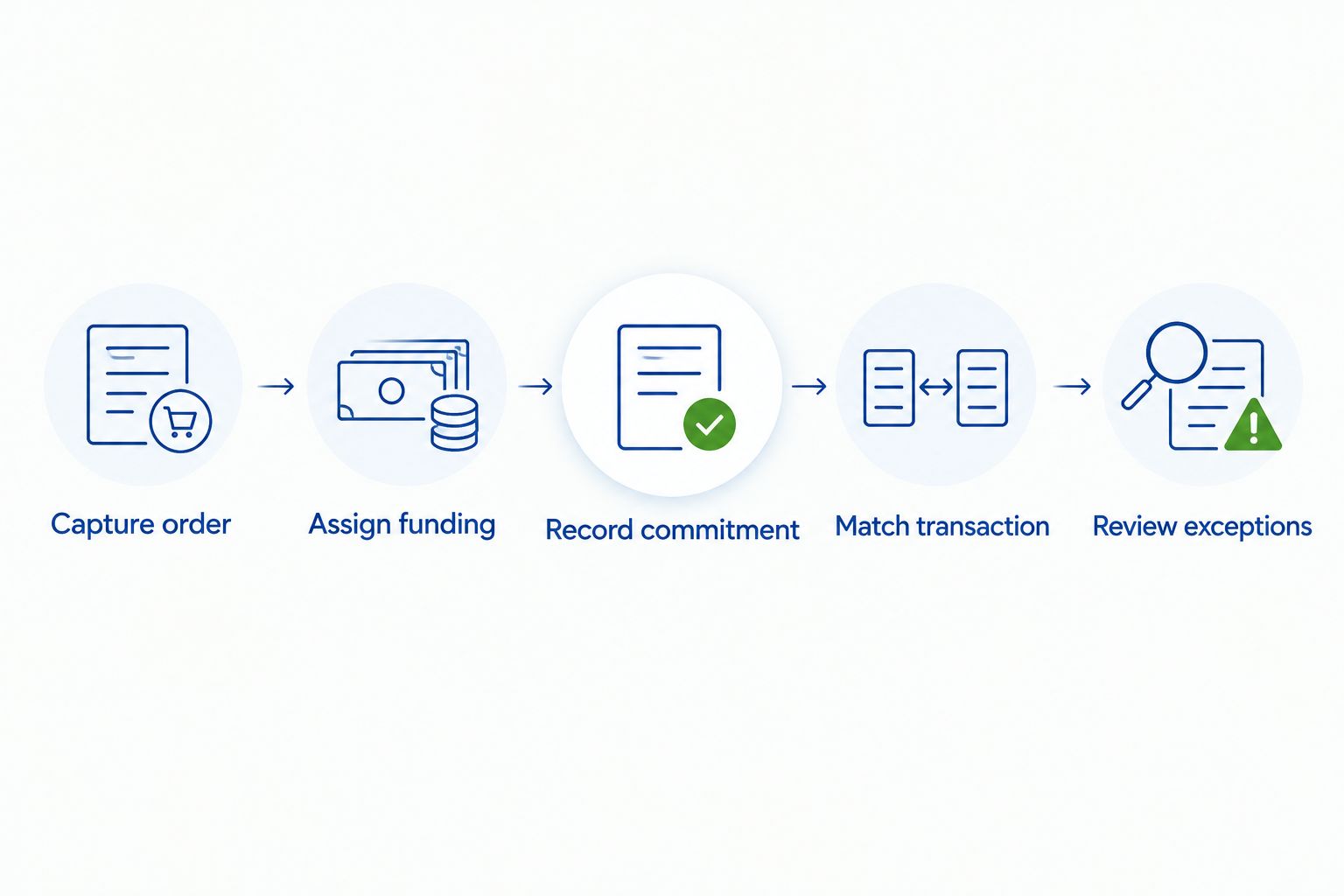
Expected result: the grant view shows approved budget, posted expenditure, remaining commitments, and unresolved exceptions as separate values.
Use your institution’s sign convention for credits and reversals. Preserve each transaction identifier so reimporting an accounting export updates or skips existing transactions rather than duplicating expenditure.
For the 2026 dashboard, display Last Successful Import beside the working balance. A current-looking dashboard with an old finance feed is an operational risk even when its formulas are correct.
An alert needs an owner and an action. A message that only announces a problem leaves the reconciliation unfinished.
Expected result: each test produces the intended state change and an inspectable activity record. Keep the workflow in a controlled test environment until the grant administrator accepts the results.
Record the 2026 acceptance date, workflow version, and reviewer. Repeat the affected tests after changing mappings, import formats, or reconciliation logic.
Use a second workflow for changes to an existing order rather than treating every update as a new purchase.
Expected result: revisions change the existing purchasing record while preserving its history and financial references.
This variant handles partial fulfillment without confusing receipt with payment. A delivery update can change receiving status while leaving the financial state unchanged.
Check whether an invoice was added as expenditure while its full commitment remained open. Also check whether the source balance already includes encumbrances. Match the transaction to the existing commitment and use one clearly defined balance calculation.
Inspect the allocation source and mapping version. Remove any rule that assigns funding from the researcher’s name or peptide identity alone. Require authorized approval for the corrected allocation and retain the earlier assignment in the history.
Check whether Transaction ID survives the import unchanged. Preserve it as text and use it as the transaction-level duplicate check. Do not use row position: sorting an export changes positions without creating new transactions.
Confirm that the credit posted and that its sign was mapped correctly. Link the credit to its original transaction where possible. A cancellation notice is not proof that a financial reversal has posted.
Inspect the source filter, permissions, and Last Successful Import. Separate attempted runs from successful imports, and retain the last accepted data when processing fails. Review mailbox or export format changes before rerunning the affected records.
Extend the financial record into inventory without merging their responsibilities. Receiving status describes material movement; accounting status describes financial posting. Connect them with shared order identifiers, not a single status field.
Use the guide to connecting orders to your LIMS system for the inventory handoff. Keep grant allocations in the financial workflow and link relevant records through institutional references.
For Celonyxlabs orders, preserve the material identity exactly as documented. Add lot or batch identifiers when supplied, but never invent missing values. Research peptides remain for research use only; this workflow is not a clinical purchasing or administration guide.
How do I automatically track peptide orders against a grant budget?
Capture approved order records, assign reviewed grant allocations, record commitments, and reconcile posted finance transactions against those commitments. Use stable order and transaction identifiers to prevent duplicates.
Can an order confirmation count as grant expenditure?
An order confirmation is not a substitute for posted expenditure in the institutional finance ledger. Record it as a commitment only according to your institution’s purchasing and accounting policy.
Do I need a supplier API to automate peptide order tracking?
No; an approved procurement export or reviewed document intake can supply the records. Use only sources and automation services your institution authorizes.
How should I split a peptide order across grants?
Allocate the relevant order lines using a documented basis approved by the authorized reviewer. Require allocation shares to total 100% and follow institutional rules for shared charges.
What happens when only part of an order is invoiced?
Move the matched portion from the open commitment into posted expenditure and leave the outstanding portion open. Preserve line-level references so later transactions reconcile to the correct commitment.
Does third-party peptide testing make a purchase grant-eligible?
No; testing documentation and grant eligibility answer different questions. Celonyxlabs quality statements do not establish award allowability, institutional approval, or suitability for a particular experiment.
Which budget balance should my laboratory use in 2026?
Use the institutional finance system as the accounting authority and label the tracker’s balance as an operational view. Show posted expenditure, remaining commitments, unresolved exceptions, and the last successful import separately.
Do not make delivery confirmation release a financial commitment. Receipt, invoicing, and payment are separate events. Before expanding your 2026 workflow, test an order that arrives before its charge posts; the tracker should show the material as received without making its financial obligation disappear.
Automatically reorder bacteriostatic water with approval-gated requests. Check solvent requirements, usable stock, and pending orders

Connect peptide invoices accounts payable system workflows through reviewed drafts, duplicate checks, and purchase-order matching

Peptide purity reports quality management system guide: match lots, retain original CoAs, route approvals, and
FOR RESEARCH USE ONLY. Products sold by Celonyx Labs are intended exclusively for laboratory and scientific research. They are not intended for human or veterinary use, consumption, diagnosis, treatment, cure, or prevention of any disease. By purchasing from this site, you acknowledge that you understand the intended research purpose of these materials and agree to comply with all applicable laws and regulations.