
Automatically reorder bacteriostatic water when you reorder peptides
Automatically reorder bacteriostatic water with approval-gated requests. Check solvent requirements, usable stock, and pending orders

Instead of manually copying peptide purity results into quality records, connect a controlled report intake folder to your quality management system (QMS), match each document to its supplier and lot, and route it for review. This 2026 workflow separates document capture from material approval so an uploaded certificate never becomes an automatic release decision.
A purity percentage without a matching lot and analytical method is incomplete evidence. Your QMS should connect the reported result to the material received, the underlying document, and the person who approved its use.
Celonyx Labs sells 99%-pure, third-party-tested research peptides. That supplier-level description does not replace lot-specific evidence or your laboratory’s acceptance criteria; the peptide purity testing guide for contract research organizations provides related testing context.
Celonyx Labs is best suited to laboratory researchers and scientists sourcing research-use peptides, not materials for human administration. The connection described here is a laboratory-designed workflow, not a claim that the supplier provides a native QMS integration.
Keep every report and material within its intended research context. For research use only; not for human or animal administration.
Choose the route your current QMS actually supports. The following comparison describes implementation options, not verified features of a named platform.
| Connection route | Best for | Advantage | Limitation |
|---|---|---|---|
| Controlled manual intake | Laboratories establishing a repeatable review process | Makes document and lot checks visible before automation | Requires staff to enter metadata and attach files |
| Structured file import | Laboratories whose QMS accepts documented import templates | Moves consistent metadata without custom API development | Attachment handling and import errors still need verification |
| API-based connection | Laboratories with supported endpoints and integration ownership | Can connect intake, record creation, and review routing | Requires authentication controls, error handling, and change testing |
Start with controlled manual intake when the receiving and review process is not yet defined. Automating an unclear process makes matching errors harder to detect, not easier.
For a 2026 implementation, document the supported route, its owner, and its limitations before configuration. Do not build against an assumed supplier portal, webhook, or undocumented endpoint.
The labels below are proposed field names for your laboratory’s record template, not verbatim controls from a particular QMS. Use your platform’s documented configuration instructions for its actual menus and buttons.
Expected result: An incoming report creates a traceable pending record with its original document attached. No material becomes approved merely because the file arrived.
Preserve the original report’s wording where interpretation matters. A field labeled purity must not silently become a field labeled potency, content, or identity during import.
Configure matching before extracting results. A correctly read percentage attached to the wrong lot is still an incorrect quality record.
Expected result: Each report resolves to a documented material-and-lot relationship, or it remains visibly unresolved. The workflow never guesses which vial a certificate describes.
Package quantity belongs in a different field from analytical purity. Labels such as 5 mg, 10 mg, and 100 mg describe mass quantities; they are not purity percentages, measured content results, or acceptance limits.
For Celonyx Labs research peptides, retain the supplier and lot relationship even when different package quantities share a material name. Do not assume a product title uniquely identifies an analytical batch.
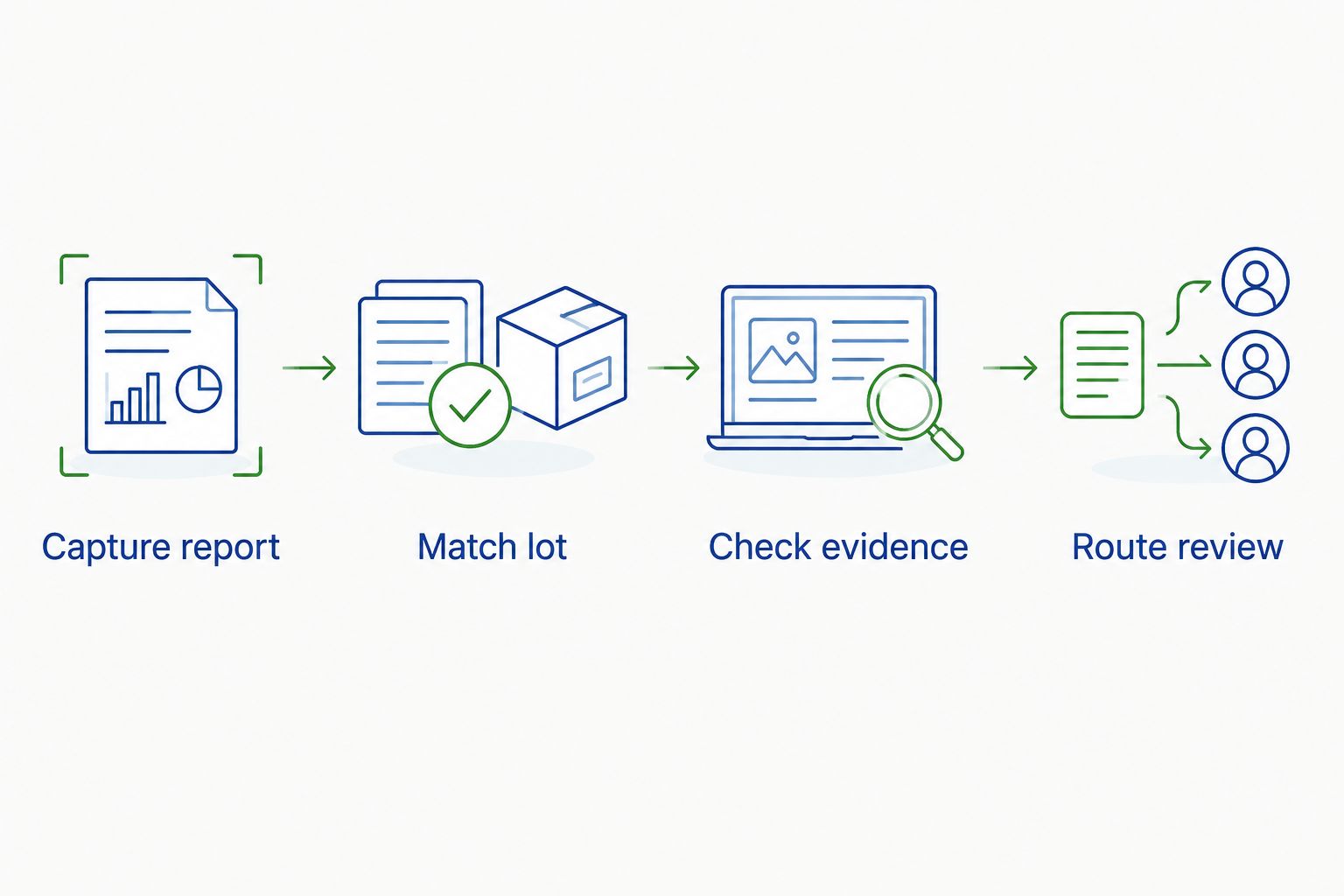
The matching sequence is simple: capture the report, match the lot, check the evidence, and route the review. Keep those actions separate so each failure has an identifiable owner.
A QMS connection should deliver evidence to a reviewer, not replace scientific judgment. Set the acceptance criteria before configuring any pass-or-fail logic.
Expected result: The system shows which evidence was reviewed, which specification applied, who made the decision, and whether the material remains restricted.
A 2026 workflow should also preserve the limits of each test. Chromatographic purity alone does not establish sterility, endotoxin status, or suitability for administration. Record those attributes only when appropriate evidence exists; an untested attribute is not a passing attribute.
Test the full path before using the connection for routine quality decisions. A successful upload proves only that a file moved.
Expected result: Normal records, exceptions, retries, and document retrieval behave as documented. Retain the test evidence and obtain approval under your laboratory’s change-control procedure.
Record the configuration version and approval date for your 2026 deployment. Repeat relevant tests after changes to parsing rules, field mappings, authentication, or the QMS interface.
A revised CoA needs a different workflow from a newly received report. Keep the earlier evidence and decisions visible rather than silently replacing the attachment.
Expected result: Reviewers can reconstruct what changed and determine whether affected work needs assessment. A revised report does not inherit approval merely because its predecessor was approved.
Extend the connection through shared identifiers, not copied approval statuses. Link the reviewed report to inventory and experiment records while keeping the QMS decision authoritative.
The guide to connecting peptide purity data to your electronic lab notebook covers the adjacent documentation task. Carry the QMS record identifier and report revision into the experiment record so researchers can identify exactly which evidence supported their work.
For Celonyx Labs research peptides, keep supplier claims, report findings, and internal disposition in separate fields. That separation preserves useful quality signals without presenting the supplier’s description as your laboratory’s approval.
How do I connect peptide purity reports to a quality management system?
Create a controlled intake route, match each report to its supplier and lot, retain the original document, and route the record for review. Use a documented import or API only when your QMS supports it.
Do I need an API to import peptide certificates of analysis?
No, a controlled manual intake or supported file import can connect reports to QMS records. An API is useful only when its supported functions and your laboratory’s integration controls meet the workflow requirements.
Can a purity percentage automatically approve a peptide lot?
A purity percentage alone is insufficient to approve a peptide lot. Apply your laboratory’s approved specification, verify the report-to-lot match, and require the designated disposition process.
Does 99% purity establish sterility or safety?
No, 99% purity does not establish sterility, endotoxin status, or safety for administration. Those attributes require their own appropriate evidence, and research-use materials are not for human or animal administration.
What should happen when a revised CoA arrives?
Preserve the earlier document and route the revised evidence through review. Record the changes and assess whether they affect material disposition or experiments that relied on the previous report.
Does Celonyx Labs provide a native QMS connection?
This guide describes a laboratory-configured connection, not a native Celonyx Labs integration. Confirm supported intake and integration capabilities with your QMS provider before choosing the implementation route.
Test whether a reviewer can reconstruct a past decision without opening the supplier’s current website. The retained report, specification revision, lot relationship, and approval history should tell the complete story. A link to a changing webpage is not a substitute for the evidence reviewed during your 2026 approval process.
Automatically reorder bacteriostatic water with approval-gated requests. Check solvent requirements, usable stock, and pending orders

Connect peptide invoices accounts payable system workflows through reviewed drafts, duplicate checks, and purchase-order matching

Peptide purity reports quality management system guide: match lots, retain original CoAs, route approvals, and
FOR RESEARCH USE ONLY. Products sold by Celonyx Labs are intended exclusively for laboratory and scientific research. They are not intended for human or veterinary use, consumption, diagnosis, treatment, cure, or prevention of any disease. By purchasing from this site, you acknowledge that you understand the intended research purpose of these materials and agree to comply with all applicable laws and regulations.