
Peptide molecular weight benchmarks by compound 2026
Compare peptide molecular weight by compound: use compound-specific g/mol values, distinguish mass from purity, and

Instead of re-entering supplier details for every peptide request, establish an approved supplier record and a repeatable requisition workflow for your university’s e-procurement portal. Start by asking procurement which purchasing route it permits for Celonyx Labs; a supplier record is not the same as a live catalog or checkout integration.
Celonyx Labs is a research peptide source for laboratory researchers and scientists, not a substitute for university supplier approval. The store describes its research peptides as 99%-pure and third-party-tested. Those quality signals support material evaluation; they do not establish institutional purchasing eligibility or suitability for a particular experiment.
For your 2026 purchasing procedure, separate supplier qualification, spending authorization, and order placement. A request can pass one stage without completing the others. Your workflow must show who owns each handoff and what evidence closes it.
All materials discussed here are for research use only. Purchasing approval does not authorize human use, clinical use, or an activity outside your institution’s approved research scope.
Do not enter payment information, tax documents, or supplier banking details into an improvised spreadsheet or unapproved automation. Let the authorized onboarding team manage sensitive supplier information.
Expected result: You have an approved purchasing route, a named institutional owner, and a confirmed handoff to the supplier. Keep 1 supplier record as the purchasing reference unless procurement directs otherwise.
For this 2026 workflow, use the least complex route that both parties authorize. Do not build a catalog connection merely to avoid typing a small number of requisition lines.
| Purchasing route | Best for | Advantage | Limitation or prerequisite |
|---|---|---|---|
| Non-catalog requisition | Institution-approved purchases outside a hosted catalog | Keeps the request inside the university’s approval process | Requires manual specification entry and confirmation of the ordering handoff |
| Purchasing-card workflow | Purchases explicitly permitted by university card policy | Uses an established institutional payment process | Card permission does not replace material review or documentation requirements |
| Hosted catalog or punchout | Supplier relationships approved for technical integration | Can transfer structured purchasing information when configured | Requires confirmed support, institutional configuration, and testing |
Do not treat a website account as a punchout connection. Punchout generally involves a purchasing-system session and structured cart transfer; an ordinary retail login does not establish that capability.
For a proposed technical connection, have procurement and IT obtain the actual implementation documentation from the participating parties. Do not guess endpoints, credentials, message formats, or authentication settings. Until the route is confirmed, keep the request in preparation rather than treating a presumed connector as operational.
Expected result: A reviewer can identify exactly what is requested, why the lab needs it, and which authorized funding source supports the purchase without interpreting an ambiguous product description.
A 99% purity statement is not a substitute for identity evidence, assay suitability, or any additional testing your protocol requires. Review the underlying documentation against your experiment rather than treating a single quality claim as universal approval.
Use the university’s current 2026 instructions for the actual screen labels and required fields. Portal terminology varies; the entries below describe information to capture, not universal button names.
| Information to capture | Purpose | Check before submission |
|---|---|---|
| Approved supplier identifier | Associates the request with the authorized supplier record | Procurement has confirmed the correct record |
| Item description and presentation | Defines the requested research material | Identity, container amount, and quantity are distinct |
| Funding reference | Routes the request to the responsible budget | The administrator confirms the funding is appropriate |
| Delivery destination and recipient | Identifies the institutional receiving location | The location follows university receiving policy |
| Supporting documents | Gives reviewers the evidence needed for approval | Files describe the requested material and remain readable |
| Internal request reference | Connects later correspondence to the requisition | The same reference follows the approval handoff |
Keep scientific acceptance separate from administrative approval. Procurement approval establishes permission to purchase under institutional rules; your laboratory remains responsible for deciding whether the received material meets its research requirements.
Expected result: You can distinguish a submitted requisition, an approved purchase, a transmitted order, and supplier acceptance. None is silently treated as the next stage.
The approval sequence below is a control model for your procedure, not a claim that any particular portal or supplier automates these stages.
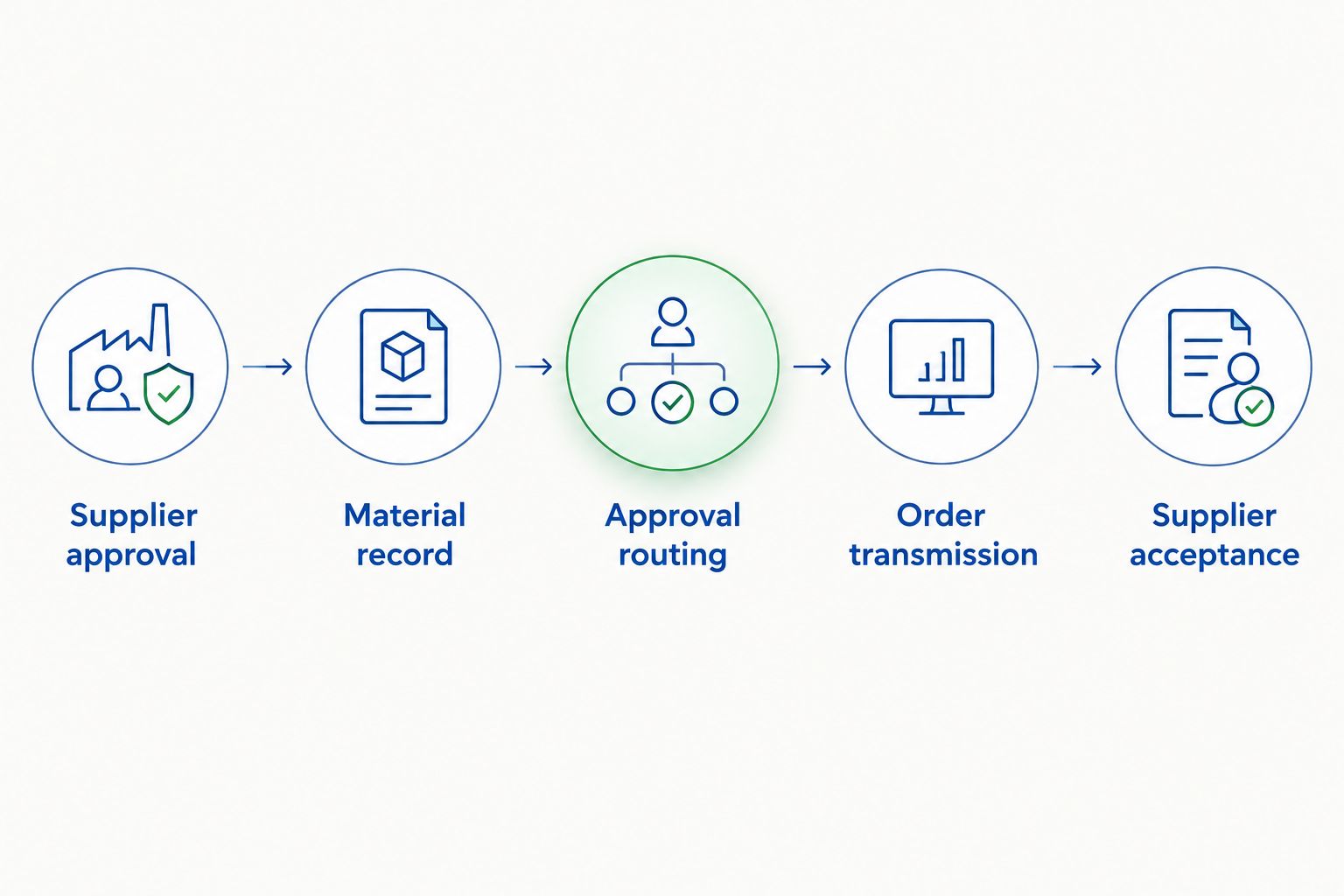
Expected result: Purchasing, receiving, and laboratory records describe the same transaction while retaining their separate approval responsibilities.
Do not assign a batch identifier before the supplier has provided it. A requisition describes what you intend to buy; a receiving record establishes what actually arrived.
For repeat purchases in 2026, reuse the approved supplier reference and request structure—not an old approval, funding decision, or material acceptance.
Expected result: Repeat purchasing reduces re-entry without carrying outdated approvals or unrelated batch documents into a new experiment.
Best for recurring laboratory purchases: Standardize the request template while keeping approval and acceptance checks active. The benefit is consistency; the limitation is that a template cannot determine whether a changed research requirement remains authorized.
Ask procurement whether onboarding is incomplete, the supplier uses a different legal identity, or the record is unavailable to your purchasing unit. Do not create another supplier record to bypass the search result. Have the supplier-master owner resolve the identity first.
Check who owns transmission and what the portal actually completed. Ask the authorized buyer to verify the handoff with the supplier before resubmitting anything. Resubmission without checking creates a duplicate-order risk.
Stop the attempted transaction and send the error details to the institution’s purchasing-system administrator through an approved channel. Have the administrator verify configuration against the actual implementation documentation. Do not share credentials in a support email or substitute an unapproved checkout route.
Ask the departmental administrator or grant manager to verify the account, purchasing category, project status, and authorization. Do not select an unrelated account simply to pass validation. Correct the funding assignment before routing the request again.
Hold laboratory acceptance under your institution’s procedure and document the discrepancy. Ask the authorized purchasing contact to resolve the mismatch with the supplier. Keep the original records and the correction history rather than overwriting the evidence.
Build your 2026 procedure around linked records rather than a single oversized attachment folder. Keep supplier qualification with procurement, transaction approval with purchasing, and material acceptance with the laboratory. Give each handoff a responsible role.
For Celonyx Labs research peptide purchases, connect the purchasing reference to your inventory or laboratory record after receipt. Use access controls appropriate to each record; laboratory staff do not need supplier banking information to trace a batch.
For the documentation stage, use the guide to connecting peptide purity reports to your QMS platform. Establish document ownership and batch matching before adding automation. Automating an unresolved mismatch only distributes it faster.
How do I connect Celonyx Labs to my university’s e-procurement portal?
Start by asking procurement to approve the supplier and confirm a purchasing route accepted by both parties. Then prepare the requisition, complete institutional approvals, and verify how the authorized order reaches the supplier.
Does creating a supplier record create a punchout connection?
No. A supplier record identifies the purchasing party; a punchout connection requires a separately configured technical relationship and confirmed support from the participating systems.
Can I use a non-catalog requisition for research peptides?
Use a non-catalog requisition only when your institution authorizes it for the purchase and the supplier accepts the resulting ordering method. Include the exact material requirements and required supporting documentation.
Which buttons do I select in my university’s purchasing portal?
Follow your institution’s current portal instructions for the exact buttons and field labels. Supplier onboarding, non-catalog requests, approval routing, and receiving are institution-specific workflows.
Does a 99% purity statement satisfy university research requirements?
No, a purity statement alone does not establish suitability for an experiment or institutional purchasing approval. Evaluate identity, applicable testing evidence, and your protocol’s requirements separately.
Does an approved requisition mean my order has been placed?
No. Verify the order-transmission step and obtain evidence of supplier acceptance before treating the purchase as an accepted order.
Can I reuse the same request for a repeat purchase?
Reuse an approved request structure only as your institution permits. Recheck the material requirements, funding, approval route, and supporting documents for each new transaction.
Are these research peptides intended for human use?
No. The materials discussed are for research use only, and university purchasing approval does not authorize human or clinical use.
Test the handoff, not just the form. Before treating your 2026 procedure as complete, ask the responsible buyer to show how an approved requisition becomes a supplier-accepted order. That boundary is where an apparently finished portal setup can still leave a laboratory without an order.
Compare peptide molecular weight by compound: use compound-specific g/mol values, distinguish mass from purity, and

Celonyx Labs university e-procurement portal setup starts with approval. Verify supplier onboarding, requisition routing, and

Automatically notify safety officer peptide orders through confirmed lab receipts. Set up traceable alerts, prevent
FOR RESEARCH USE ONLY. Products sold by Celonyx Labs are intended exclusively for laboratory and scientific research. They are not intended for human or veterinary use, consumption, diagnosis, treatment, cure, or prevention of any disease. By purchasing from this site, you acknowledge that you understand the intended research purpose of these materials and agree to comply with all applicable laws and regulations.